Proxy Server Configuration
With only MPLS or private connectivity available, it is possible to leverage a connection a public URL or to MIST using an explicit proxy and a private web proxy in the network. This type of web proxy is often used to bridge the gap between private and public networks.
The following support is provided for proxy server configuration:
- Proxy IP per WAN interface
- Configuration override of proxy IP per WAN link
- Proxy IP for public URLs accessed by SSR. For example:
- Websense
- Sophos Server
- Juniper Software download
- Proxy IP for an SSR to Mist connection (Secure ZTP Onboarding)
This document provides information to configure the SSR to identify and use the non-transparent proxy. That information can also be used to perform the Mist secure ZTP onboarding process.
Anti-Virus configurations do not support the use of the proxy server. Anti-Virus will not work when a proxy server is enabled.
Configure an SSR Web Proxy
By default the SSR uses DHCP to identify the SSR web proxy addresses. To leverage a connection using an explicit proxy and a private web proxy, you can configure the SSR to either configure a static proxy IP address and port, or dynamically learn the proxy address.
Static
To set the proxy IP addresses manually, configure the management-proxy mode to static, and enter the IP address and port to be accessed by the SSR.
config authority router router management-proxy mode   static
config authority router router management-proxy proxy 10.0.0.1 address  10.0.0.1
config authority router router management-proxy proxy 10.0.0.1 port     5000
This same address will be used for both nodes in an HA pair, and across all WAN interfaces.
Optionally, you can use the onboarding-config.json to set the static IP address and port number until the router is onboarded to the conductor. For additional information about using the onboarding-config.json see Onboarding Configuration.
Learned
The SSR can be configured to dynamically learn proxy addresses from a DHCP-server on the network.
When the router management-proxy is enabled, the default mode is learned. In this case, the device will identify the web proxy addresses from a DHCP server on the network.
config authority router router management-proxy enable
config authority router router management-proxy mode  learned
The following diagram describes the DHCP discovery process.
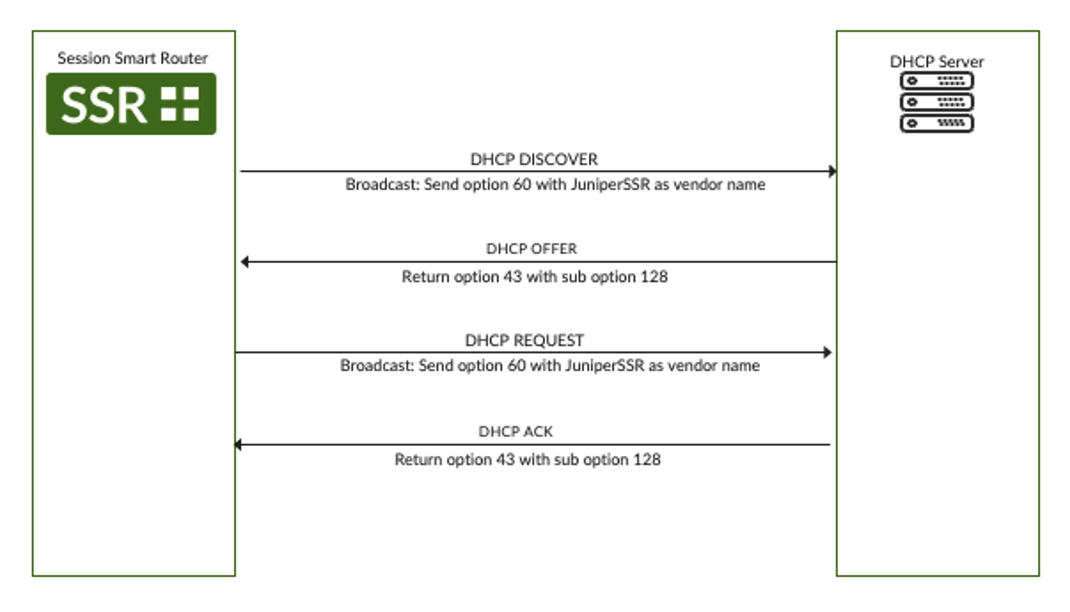
- The SSR sends a DHCP DISCOVER message with
Option 60and value ofJuniperSSR. The message also includesOption 43as a requested parameter.
08:34:24.685760 IP (tos 0x0, ttl 128, id 0, offset 0, flags [none], proto UDP (17), length 306)
    0.0.0.0.bootpc > 255.255.255.255.bootps: [udp sum ok] BOOTP/DHCP, Request from fa:16:3e:14:db:05 (oui Unknown), length 278, xid 0xe5dadd09, Flags [none] (0x0000)
	  Client-Ethernet-Address fa:16:3e:14:db:05 (oui Unknown)
	  Vendor-rfc1048 Extensions
	    Magic Cookie 0x63825363
	    DHCP-Message Option 53, length 1: Discover
	    Client-ID Option 61, length 7: ether fa:16:3e:14:db:05
	    Parameter-Request Option 55, length 4:
	      Subnet-Mask, Default-Gateway, Domain-Name-Server, Vendor-Option
	    Vendor-Class Option 60, length 10: "JuniperSSR
- To enable proxy auto-discovery, the DHCP server must send DHCP option
43with a sub-option of128. The sub-option should contain the proxy address and port information.
08:34:25.687329 IP (tos 0x10, ttl 128, id 0, offset 0, flags [none], proto UDP (17), length 337)
    linux-router.novalocal.bootps > 10.73.3.50.bootpc: [udp sum ok] BOOTP/DHCP, Reply, length 309, xid 0xe5dadd09, Flags [none] (0x0000)
	  Your-IP 10.73.3.50
	  Client-Ethernet-Address fa:16:3e:14:db:05 (oui Unknown)
	  Vendor-rfc1048 Extensions
	    Magic Cookie 0x63825363
	    DHCP-Message Option 53, length 1: Offer
	    Server-ID Option 54, length 4: linux-router.novalocal
	    Lease-Time Option 51, length 4: 6000
	    Subnet-Mask Option 1, length 4: 255.255.255.0
	    Default-Gateway Option 3, length 4: linux-router.novalocal
	    Domain-Name-Server Option 6, length 8: dns.google,dns.google
	    Vendor-Option Option 43, length 17: 10.92.53.8:3128
- The same sequence repeats for
DHCP REQUESTandDHCP ACKmessages. This ensures that the information is successfully obtained during lease renewals.
By default, the SSR includes the above options in its DHCP discovery implementation. When the router management-proxy is enabled, the discovered proxy is used.
Network Interface Override
In a case where you do not want an SSR to learn a proxy address from a network interface, you can disable learning mode on that interface. This allows a user to define from which network-interfaces the web-proxy can be learned.
config authority router router network-interface enable-proxy-discovery false
Proxy Address Selection
It is possible that multiple SSR device-interfaces may be configured to use a DHCP client, which could result in learning multiple IP addresses. This may happen in cases where a device has multiple interfaces with dhcp enabled, or in an HA deployment using learned mode.
In these situations, the SSR will use the lowest integer value from the list of proxy-addresses learned. For example, if the DHCP mode learns the following address:
192.168.10.10, 192.168.10.11
The SSR will select 192.168.10.10 - the address with the lowest integer value.
Troubleshooting
Use the following commands to see the learned proxy address and the selected proxy address.
show dhcp learned-proxiesshows all learned proxy addresses for each network-interface.show management-proxyshows the active proxy (if applicable).