Disable SSR4x0 Management Interfaces
Version History
| Release | Modification |
|---|---|
| 7.1.0 | Support for disabling SSR4x0 Management interfaces added. |
The following configuration fields have been added to node configuration, allowing you to control physical security features on the SSR4x0 series. A true setting enables the feature, false disables the feature.
usb-mass-storage-enabled true
serial-console-enabled true
recovery-mode-enabled true
reset-button-enabled true
Use the following configuration commands to disable out of band management ports on the SSR400 and SSR440 - the USB and Serial ports, and block the local admin access.
Setting via PCLI:
The flags are marked as advanced config and do not autocomplete.
config authority router router1 node node1 usb-mass-storage-enabled true
config authority router router1 node node1 serial-console-enabled true
config authority router router1 node node1 recovery-mode-enabled true
config authority router router1 node node1 reset-button-enabled true
Setting via GUI:
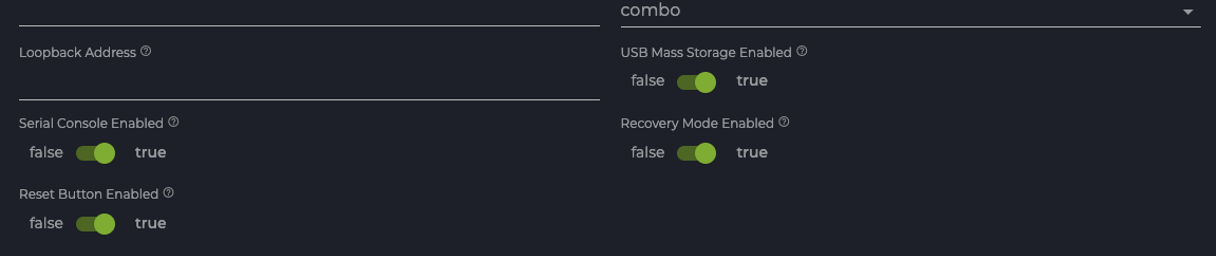
Changes made and committed require a reboot to take effect.
How It Works
Each of the port commands is described below.
Disable USB
When disabled (set to false), the USB host controller is excluded from the devicetree. No driver is bound by the operating system or applications.
Disable Reset Pushbutton
When disabled (set to false), the push button interrupt is disabled, and no action will be taken by the operating system or applications in response to a button push. However, with the push button disabled, device reboot is possible from either the command line or through Mist.
Disable Serial Console Port
When disabled (set to false), the serial console is excluded from the kernel command line, and no driver will be bound by the operating system or applications. Kernel error logs are only accessible via the system journal.
Disable Firmware Recovery
When disabled (set to false), the boot firmware Press Esc to boot from USB option and the image boot menu are prevented. The configured active boot image will be auto loaded; no recovery paths except system zeroization are available in the event of a boot failure.
Uninterruptible Boot Process
This feature is configured on the SSR400 and SSR440 by setting both the Serial Console Port and Firmware Recovery as disabled. When configured, it means that a failed upgrade will not allow the user to select the image on the other volume (since the Console port is disabled, no user input is possible).
If both the Serial Console Port and Firmware Recovery are disabled, and an incorrect or empty IP address is configured for one of the Ethernet ports (or system boot repeatedly fails for any other reason), use the push button to Reset to the Rescue configuration.
If the Reset push button is also disabled, the Zeroization process or RMA to Juniper are the only methods available for recovery.
It is strongly recommended that recovery not be disabled on production units until post-deployment boot has been successfully validated.