Step 2: Initialize and Access the Conductor
This step verifies that the BYOL installation has completed successfully, confirms the conductor is running, and walks you through logging in to the conductor GUI for the first time.
Wait for Installation to Complete
The BYOL bootstrapper installs SSR 7.1.4 automatically after the VM is deployed. This process takes approximately 20 minutes after the VM first starts. The SSR Install screens do not open - this process takes place behind the scenes.
Verify the Successful Conductor Installation
You can verify the successful conductor installation by logging in to the Conductor GUI using the Conductor Primary NIC public IP address.
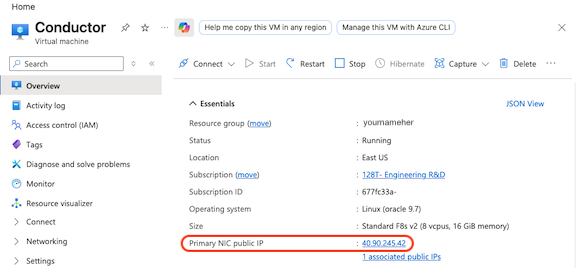
Attempting to open the Conductor GUI before the installation has completed - i.e., not waiting 20 minutes - will result in an error message. This DOES NOT mean the installation failed, it means it has not completed yet. If you get an error message, wait longer, then try again.
-
Open a browser and navigate to
https://<conductor-public-ip>.noteThe conductor uses a self-signed certificate. If your browser presents an "unsafe connection" warning, click through to continue. You can replace the certificate later.
-
Log in with the following default credentials:
Field Value Username adminPassword 128TadminimportantYou must change the default password immediately after first login. The new password requires a minimum of 9 characters containing at least 1 uppercase letter, 1 lowercase letter, and 1 number.
-
A successful login confirms the conductor is running and reachable on the public IP.
Troubleshooting the Installation
Device Does Not Initialize Properly
Once the instance is launched with the correct parameters, the device will begin to install the SSR software. After installing the software, the device will initialize as a Conductor. This process can take up to 15 minutes to complete.
If the instance does not install SSR as expected, SSH into the instance using the credentials provided during VM creation.
ssh -i <private-ssh-key> t128@<conductor-public-ip>
-
Try to log into the pcli, run
su admin, enter your password, and thenshow system. -
If the pcli is not accessible or the status and necessary action is not obvious, capture the Hardware Bootstrapper tech support (
/var/log/128T-hardware-bootstrapper/hardware-bootstrapper-tech-support.zip) and examine the journal for128T-hardware-bootstrapper, andember.
Next Step
Proceed to Step 3 — Configure the Conductor.